NVIDIA GPU Architecture
Architectures enabling efficient parallel computation for AI and HPC workloads

GPU Architecture (Performance/Capabilities)
NVIDIA GPU architectures: Pascal, Volta, Turing, Ampere, Hopper, Ada Lovelace, Blackwell
GPU architecture describes how efficiently the GPU can
Perform floating-point operations (speed and precision)
floating-point numbers (“floats”): decimal numbers
float operations
addition, subtraction, multiplication, division of floats
matrix operations
matrices (2D arrays of numbers) - matrix multiplication, matrix addition, transpose/inversion, etc
etc
resource intensive
deep learning requires massive parallel matrix multiplications - fast
FLOPS: floating point operations per second, measures speed
Floats can't represent every possible real number, only a subset, because you're using a fixed number of bits to encode them. [1]
eg, real numbers like π, √2 are infinite and continuous, but computers can only store a finite number of bits (e.g., 32 bits in FP32), so they can only represent a limited set of those real numbers.)
many real numbers are rounded to the nearest representable value
Handle low- and high-precision number formats (precision v. speed), eg,
FP32 (single precision)
32-bit float format with ~7 decimal digits of precision (2²³ mantissa)
32 bits of binary to represent numbers
balances accuracy and speed: fewer digits than double precision → less accurate → uses less memory → faster
FP16 (half precision)
FP64 (double precision) 2^52 (rarely used for DL; mostly scientific computing with strong precision requirements: manufacturing product design, mechanical simulation, fluid dynamics)
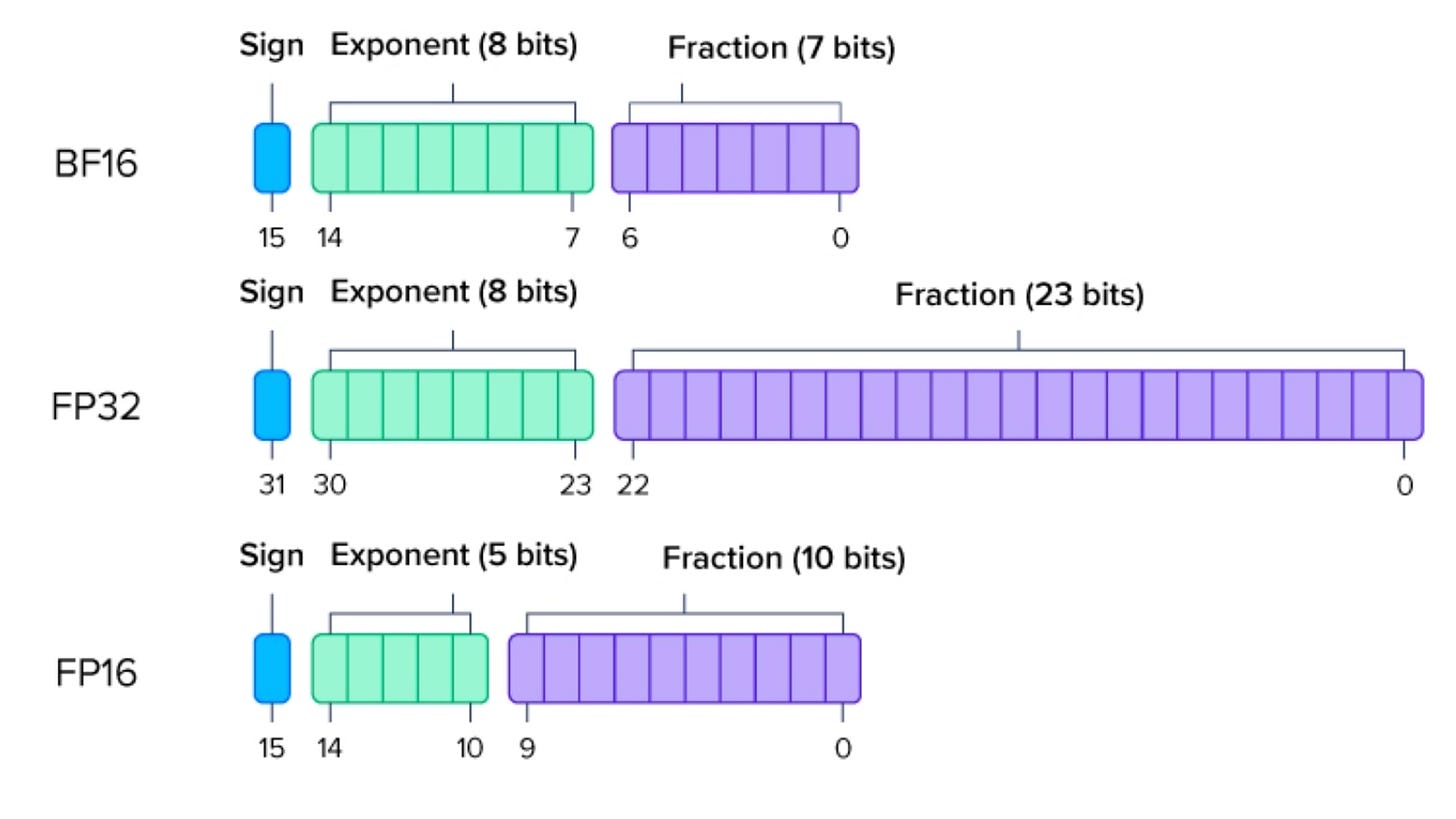
Image source: ExxactCorp, Defining Float Point Precision (2024), https://www.exxactcorp.com/blog/hpc/what-is-fp64-fp32-fp16
BF16/BFloat16
In deep neural network training, mixed precision training combines different precision number formats in one computational workload
Execute indexing and address computations
Read from and write to memory
Utilize registers and shared memory capacity for parallel execution
Shared memory capacity
Data Center GPUs: Ampere vs. Volta
Ampere (100) v. Volta (V100) - Data Center Cards
Ampere (A100) is the successor to Volta (V100) in NVIDIA data center GPUs. A100 delivers performance gains through architectural improvements and support for new low-precision data formats optimized for AI and HPC workloads.
Advancements in Ampere (A100) v. Volta (V100)
Ampere A100 is a data center GPU succeeding Volta V100.
Introduces new low-precision datatypes optimized for AI (eg, marching computations):
BFloat16 (BF16):
16-bit format used on TPUs.
Larger dynamic range than FP16, avoiding underflow/overflow issues.
Fewer mantissa bits than FP32 but maintains FP32’s exponent range.
Provides more stable numerical behavior than FP16, especially if FP32 doesn’t underflow.
TF32 (TensorFloat-32):
Drop-in replacement for FP32.
Same 32-bit container, but uses fewer mantissa bits during matrix multiplication for speed.
Runs faster than FP32 with minimal accuracy loss and no code changes needed.
Performance improvements (A100 vs. V100):
Higher peak compute performance (FLOPS).
Increased memory bandwidth for bandwidth-bound workloads.
Faster runtimes even without using BF16 or TF32.
Best practice:
Use low-precision types (BF16, TF32, FP16) on V100/A100 to leverage tensor cores and maximize throughput.
Pure FP32 computations underutilize the hardware capabilities.
Volta (V100):
First data center GPU with tensor cores enabling fast low-precision matrix operations.
Consumer GPU Cards: Turing and Beyond
Turing (e.g., 20-series) is the consumer counterpart to Volta.
Supports fast integer operations, enabling quantized inference (method to speed up inference) for faster model execution.
50-, 40-, and 30-series cards are newer consumer GPUs with increasing performance.
30-series (Ampere) aligns with A100 architecture.
Suitable for local deep learning and inference workloads.
Accessing A100 and V100 GPUs
A100 and V100 are data center GPUs, not designed for consumer use.
Lack active cooling, so they can’t be safely used in desktop PCs/rigs, even high-end ones.
Intended for use in cloud platforms like AWS, GCP, or Azure.
AWS instances
Consumer equivalents: NVIDIA 30-series GPUs (e.g., RTX 3080, 3090)
Use similar architectures (Ampere) with active cooling, suitable for local development.
Specifying GPU Architecture in PyTorch Code
PyTorch codebase rarely references “Ampere” or “Volta” directly
uses SM (Streaming Multiprocessor) versions instead.
SM (Streaming Multiprocessor) = core execution unit in NVIDIA GPUs.
Each GPU contains many SMs to enable parallel processing.
Early GPUs: ~10–20 SMs; Modern GPUs: ~100 SMs.
Each SM can handle ~2000 threads concurrently.
SMs include:
Compute cores for integer, floating-point, and low-precision ops
On-chip memory for fast intermediate data access
Schedulers for thread-level execution control
GPU performance is tied to the capabilities of its SMs, not just the chip name.
SM versions map to GPU architectures, eg,
SM_61 → Pascal
SM_70 → Volta
SM_75 → Turing
SM_80/86 → Ampere
When compiling or optimizing for PyTorch, focus on SM version, not just the marketing name of the GPU.
Using GPUs: CUDA and Driver Compatibility
Running GPU software requires
CUDA-capable driver (installed on computer system): software that allows NVIDIA graphics card to interact with CUDA
CUDA Toolkit (to compile and build GPU code and leverage GPU parallel processing capabilities)
Driver and Toolkit versions must be compatible for the GPU to function properly.
This compatibility has become more flexible recently, making setup easier.
Each GPU architecture requires a minimum CUDA Toolkit version to compile code targeting it.
Example: Ampere GPUs need at least CUDA 11 to compile directly for their architecture.
Newer GPUs can be run with older drivers/toolkits because:
Older toolkits compile code into an intermediate form called PTX instead of final binary.
The driver just-in-time (JIT) compiles PTX to the GPU binary at runtime.
The first time PyTorch is run on a GPU (or after updating), it compiles GPU functions called kernels on demand (ie, JIT). This JIT compilation converts intermediate code (PTX) into machine code that the GPU can execute
PTX (Parallel Thread Execution) is a key intermediate representation (IR) in NVIDIA's CUDA programming environment. It bridges between high-level CUDA C++ code and hardware-specific machine code (SASS) that runs on NVIDIA GPUs.
SASS (Streaming ASSembler): assembly language format for programs running on NVIDIA GPUs; lowest-level, human-readable format for programming NVIDIA GPU hardware
the first time PyTorch runs, there might be a delay while these kernels compile.
after that, compiled versions are cached, and future runs are faster
GPU choices: data center power v. consumer accessibility
big research clusters (data center GPUs, eg, Ampere, Volta) enable research at scale for numerous DL models
for small projects, meaningful DL development and experimentation are possible on consumer hardware or accessible cloud platforms (Google Colab instances)
consider amount of memory GPU has: DL workloads are bottlenecked GPU memory (VRAM) capacity (aka, video memory, video card)
limits model size, batch sizes you can train or infer with
at least 8GB VRAM
consider that AlexNet was trained on consumer grade cards (don’t always need massive clusters to get started or make progress)
RTX 5070 Ti
Specification: RTX 5070 Ti
Tensor Cores 280, 5th‑gen
AI Performance ~1,406 TOPS
CUDA Cores 8,960
Architecture Blackwell
FP16 / BF16 Support: Yes, with AMP & Tensor cores
Use for Mixed Precision: Excellent for FP16/BF16 training
Architecture (Consumer and Data Center GPUs)
Consumer (RTX): air-cooled (fans), VRAM (24GB), no ECC memory, low FP64 performance, minimal error handling/RAS, PC-friendly form factor
Data center (A/H/B): passive cooling, more VRAM (80-192GB HBM), ECC memory support, NVLink/full multi-GPU support, high FP64 performance (scientific computing), robust error handling / RAS (reliability, availability, serviceability), server-friendly form factor (rack units, no display outputs)
Pascal (2016)
GTX 10-series (e.g., 1080 Ti)
Tesla P100, P40
Volta (2017)
Titan V
Tesla V100
Turing (2018)
RTX 20-series (e.g., 2080 Ti)
T4, RTX 6000/8000 (Turing Quadro), Tesla T4
Ampere (2020)
RTX 30-series (e.g., 3090 Ti)
A100, A30, A10, RTX A6000/A5000
Hopper (2022)
No consumer equivalent
H100, GH200 (Grace-Hopper superchip), H800
Ada Lovelace (2022)
RTX 40-series (e.g., 4090, 4080)
RTX 6000 Ada Generation
Blackwell (2025)
RTX 50-series (e.g., 5090, 5070 Ti)
B100, B200, RTX 6000 Blackwell
References
All about NVIDIA GPUs (2021), PyTorch Developer Podcast, https://pytorch-dev-podcast.simplecast.com/episodes/all-about-nvidia-gpus
Floating point
Jeff Johnson, Making floating point math highly efficient for AI hardware (2018), https://engineering.fb.com/2018/11/08/ai-research/floating-point-math/
ExxactCorp, Defining Float Point Precision (2024), https://www.exxactcorp.com/blog/hpc/what-is-fp64-fp32-fp16
Mixed precision training
Paulius Micikevicius et. al., Mixed Precision Training (2017), https://arxiv.org/abs/1710.03740
NVIDIA, Train with Mixed Precision (2023), https://docs.nvidia.com/deeplearning/performance/mixed-precision-training/index.html#introduction
Next steps
V/A/H diagrams to compare architectures; annotated PyTorch SM version examples; float precision format use cases FP16, BF16 for specific DL tasks